Add a configuration
A configuration links one WhatsApp integration to one Jira Service Management (JSM) project. It defines where new issues are created and when a conversation is considered finished. Create it first, then connect the integration to Meta in the next steps.
1. Open WhatsAppBridge
- In Jira, go to Apps → Manage apps.
- In the left-hand menu, select WhatsAppBridge.
The WhatsApp integrations page lists all Saved configurations.
2. Create a new configuration
-
Click + Add configuration.
-
Fill in the New configuration form:
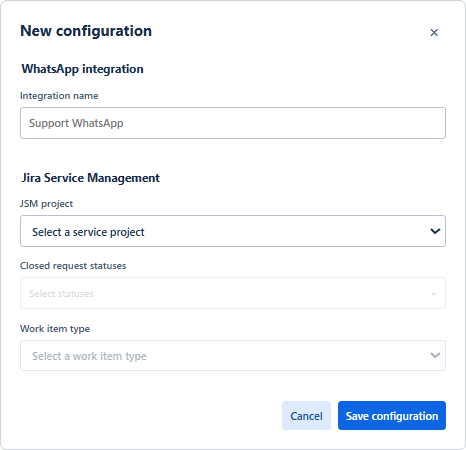
Field Description Integration name A name for this integration, for example Support WhatsApp. It is shown in the list of saved configurations.JSM project The service project where the plugin creates issues from WhatsApp messages. Closed request statuses The statuses that the plugin treats as "closed". A message from a customer whose issue is in one of these statuses is not added to that issue. Available after you select a project. Work item type The issue type of the issues created from WhatsApp messages. Available after you select a project. -
Click Save configuration.
info
Closed request statuses and Work item type are loaded from the selected project. Select the JSM project first, otherwise these fields stay disabled.
The new configuration appears in Saved configurations.
Next: Create a Meta app.